
Download BlackInk – Instant AI Tattoo Design Generator, Free Trial, Secure Online Tool
If you’ve ever stared at endless feeds of tattoo images, hoping to stumble upon that perfect flash design, you know how time‑consuming and frustrating the hunt can be. BlackInk steps into that gap as a modern, AI‑driven solution that transforms a simple keyword into a fully‑fledged tattoo flash sheet in seconds. Built by the creative studio behind the popular blackink brand, this web‑based application combines a massive library of over 2,000 pre‑curated motifs with a cutting‑edge generative model that can adapt to a wide variety of styles—from classic blackwork to experimental sketch.
Whether you’re a tattoo‑enthusiast searching for inspiration, a freelance artist building a portfolio, or a studio looking to streamline client consultations, BlackInk offers a secure, fast, and cost‑effective workflow. The platform runs entirely in the browser, eliminating the need for bulky installations, and it supports Windows, macOS, Android, and iOS devices. A generous free trial lets you generate up to five designs per day without any credit‑card commitment, while a modest subscription unlocks unlimited access and advanced customisation options.
With HTTPS encryption, encrypted cloud storage, and a dedicated artist‑collaboration mode, BlackInk keeps your ideas private and ready for professional use. In short, it’s a powerful, user‑friendly tool that brings AI creativity directly to your fingertips, turning imagination into ink‑ready artwork with just a few clicks.
Overview – How BlackInk Changes the Tattoo Design Landscape
BlackInk is a cloud‑hosted AI application designed specifically for flash tattoo creation. At its core, the software uses a deep‑learning model trained on a diverse dataset of tattoo artwork, allowing it to understand stylistic nuances such as line weight, shading density, and motif composition. When a user enters a keyword—like “sakura blossom,” “mechanical owl,” or “minimalist compass”—the AI instantly synthesises a high‑resolution flash sheet that reflects the chosen aesthetic.
Unlike generic image generators, BlackInk’s output is optimised for tattoo application: lines are crisp, contrast is balanced, and the designs are delivered in both raster (PNG) and vector (SVG) formats, ensuring they can be scaled without loss of detail. The platform also includes a secure user account system that stores generated designs for 30 days, giving artists the flexibility to revisit or edit concepts during client consultations. By automating the initial ideation phase, BlackInk frees up valuable studio time, allowing artists to focus on refinement, shading, and placement rather than endless scrolling through inspiration boards.
Moreover, the AI model receives monthly updates based on community feedback, meaning the style library continuously expands with fresh motifs and emerging trends. Whether you’re a beginner looking for a bold starter piece or a seasoned professional seeking fresh ideas for a full‑sleeve, BlackInk delivers a reliable, fast, and secure design pipeline that fits seamlessly into modern tattoo workflows.
Key Features That Make BlackInk Stand Out
BlackInk packs a robust set of capabilities that cater to both casual users and professional tattoo studios. Below is an in‑depth look at the most compelling functionalities, each designed to streamline the creative process and enhance the final artwork.
- Instant Design Generation: Produce a complete flash sheet in under 10 seconds after entering a keyword, drastically reducing research time.
- Extensive Style Library: Access over 2,000 AI‑curated designs spanning Dotwork, Blackwork, Sketch, Neo‑Traditional, and hybrid styles, ensuring a match for any aesthetic preference.
- Customisation Controls: Fine‑tune line thickness, shading intensity, and composition balance with intuitive sliders; advanced users can also adjust contrast and negative space.
- High‑Resolution Export: Download designs in PNG (300 dpi) for raster use or SVG for limitless scalability, making the files ready for both small‑area tattoos and full‑back pieces.
- Free Trial Access: Generate up to five designs per day without a subscription, providing ample opportunity to test the workflow before committing.
- Secure Cloud Storage: All creations are saved on encrypted servers for 30 days, allowing retrieval, versioning, or sharing via a private link.
- Artist Collaboration Mode: Share a secure URL with a tattoo artist who can annotate placement, suggest colour palettes, or add notes directly on the design canvas.
- Cross‑Platform Web App: No download required – works on any modern browser on Windows, macOS, Chrome OS, Android, or iOS, ensuring maximum accessibility.
- Regular AI Updates: The underlying model is refreshed monthly, adding new motifs and style variations based on community feedback and emerging tattoo trends.
- Responsive Customer Support: 24/7 live chat and email assistance are available for troubleshooting, creative advice, and subscription queries.
Each feature is built with the user experience in mind, ensuring that whether you are sketching a quick concept or preparing a comprehensive client portfolio, BlackInk provides the tools needed to turn ideas into market‑ready flash sheets quickly and securely.
Installation, Compatibility, and Step‑by‑Step Usage Guide
Supported Platforms: BlackInk runs entirely in the browser, making it compatible with Windows 10/11, macOS Ventura and later, Chrome OS, Android 9+, and iOS 13+. The only requirement is a stable internet connection and a modern browser (Chrome, Firefox, Safari, or Edge) that supports WebGL and HTML5.
Getting Started – No Installation Required
- Visit the official BlackInk website (blackink.ai) and click the “Start Free Trial” button.
- Create a lightweight account using an email address or sign in with Google/Apple ID – the process takes less than a minute.
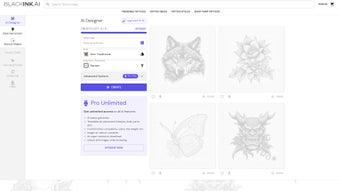
- Once logged in, you will be presented with a clean dashboard featuring a keyword input field, style selector, and a preview canvas.
- Enter a descriptive keyword (e.g., “dragon skull”, “floral mandala”, “minimalist compass”) and select the desired style from the dropdown menu.
- Use the “Advanced Settings” panel to fine‑tune line weight, shading intensity, and overall composition. These sliders are optional; the AI will generate a balanced design by default.
- Click “Generate” and watch the AI compose a flash sheet within seconds. The result appears in the preview pane, where you can zoom, rotate, or request a new variation.
- When satisfied, press “Download” to save the image as PNG (300 dpi) or SVG (vector). For collaborative work, click “Share Link” to send a secure URL to your tattoo artist.
- All generated designs are automatically stored in your “My Library” for 30 days, allowing you to revisit or edit them later.
Tips for Optimal Use
- Combine specific keywords with style descriptors (e.g., “blackwork phoenix”) to guide the AI toward more accurate results.
- Use the “Variation” button to explore alternative compositions without losing the original concept.
- Export as SVG when you need infinite scalability, especially for large back pieces or detailed sleeve work.
- Leverage the “Artist Collaboration Mode” to annotate placement ideas directly on the design before sending it to the studio.
- Regularly check the “Updates” tab to see new style packs added after each monthly AI refresh.
- If the initial design feels too generic, add secondary descriptors (e.g., “geometric”, “tribal”) to refine the output.
By following these steps, even users with limited design experience can produce professional‑grade flash sheets that meet studio standards, while seasoned artists can accelerate their concept‑development phase and focus more on shading and colour work.
Pros, Cons, Frequently Asked Questions & Final Verdict
Pros
- Lightning‑fast design generation saves hours of manual research.
- Huge variety of styles, from classic blackwork to experimental sketch.
- No software download – works on any modern browser.
- Free trial lets users test the tool without financial risk.
- High‑resolution exports suitable for professional studio use.
- Secure cloud storage and encrypted connections protect user data.
- Artist Collaboration Mode streamlines client‑studio communication.
- Monthly AI updates keep the style library fresh and relevant.
Cons
- Limited to five free designs per day; heavy users will need a subscription.
- AI may occasionally produce designs that need minor artistic refinement.
- Advanced customisation (e.g., colour palettes) is only available in paid plans.
- Requires a stable internet connection; offline usage is not supported.
- Designs are stored for only 30 days unless downloaded, which may be inconvenient for long‑term archiving.
Overall, BlackInk delivers on its promise of instant, high‑quality flash tattoo generation. The combination of a massive style library, rapid AI processing, and seamless web‑based access makes it a valuable addition to any tattoo artist’s toolkit or a hobbyist’s creative arsenal. While the free tier is generous enough for casual experimentation, professionals looking for unlimited output will find the subscription worthwhile.
Frequently Asked Questions
Is BlackInk really free to use?
Yes, BlackInk offers a free trial that lets you generate up to five designs per day. No credit‑card information is required, and the trial never expires. For unlimited access, a paid subscription is available.
Can I download designs in vector format?
Absolutely. All generated flash sheets can be exported as SVG vectors, which preserve infinite scalability and are ideal for large‑scale tattoos.
Do I need any special hardware or software?
No. BlackInk runs entirely in the browser. A modern PC, Mac, tablet, or smartphone with an up‑to‑date browser and an internet connection is sufficient.
How secure is my data on BlackInk?
BlackInk uses HTTPS encryption for all data transfers and stores your designs on encrypted cloud servers for 30 days. Your personal information is never sold to third parties.
Can I share a design directly with my tattoo artist?
Yes. The “Artist Collaboration Mode” generates a private link that you can send to your artist. They can add notes, suggest colour changes, or mark placement directly on the design.
Conclusion – Should You Download BlackInk?
If you’ve ever felt frustrated by endless scrolling on social media looking for the perfect flash tattoo, BlackInk offers a refreshingly efficient alternative. The platform’s instant AI generation, extensive style catalog, and browser‑based convenience make it a standout tool for both beginners and seasoned tattoo professionals. While the free tier provides ample opportunity to explore the service, serious artists will likely benefit from the paid plan’s unlimited output and advanced customisation options. In short, BlackInk delivers a secure, fast, and creatively inspiring experience that bridges the gap between imagination and ink. Download BlackInk today, start your free trial, and see how quickly you can turn a simple keyword into a stunning, ready‑to‑tattoo flash sheet.



.png)



